post
https://api.instantpay.in/fi/aeps/transactionOtp
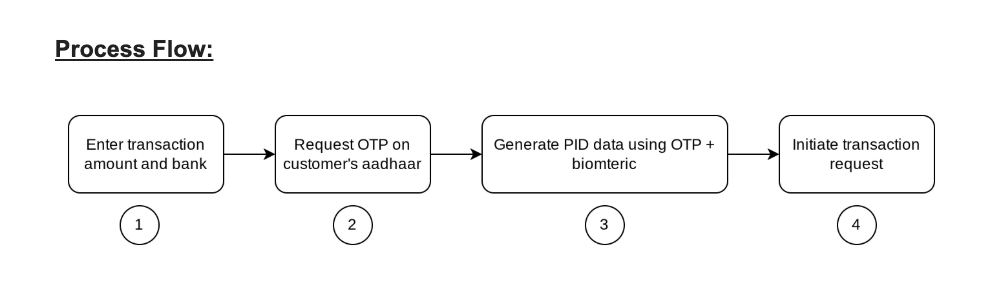
This API will be used to generate the OTP for AePS cash withdrawal transactions where transaction amount exceeds 5000
Recent Requests
Log in to see full request history
| Time | Status | User Agent | |
|---|---|---|---|
Retrieving recent requests… | |||
Loading…
Header Parameters
| Name | Type | Description | Mandatory (M) , Optional (O) | Provided by INSTANTPAY (Y/N) |
|---|---|---|---|---|
| X-Ipay-Auth-Code | String | Auth Code - 1 (Fixed) | M | Y |
| X-Ipay-Client-Id | String | Unique Client ID | M | Y |
| X-Ipay-Client-Secret | String | Unique secret key | M | Y |
| X-Ipay-Outlet-Id | String | Merchant unique ID | M | Y |
| X-Ipay-Endpoint-Ip | String | End Customer IP Address | M | N |
Request Parameters
| Name | Type | Mandatory (M) , Optional (O) | Description |
|---|---|---|---|
| bankiin | String | Mandatory | IIN Number of the CW Bank |
| encryptedAadhaar | String | Mandatory | Encrypted aadhaar of the User |
| latitude | String | Mandatory | Merchant Location in Latitude |
| longitude | String | Mandatory | Merchant Location in Latitude |
| amount | String | Mandatory | Withdrawal Amount |
| mobile | String | Mandatory | Mobile Number of the User |
Sample Request
curl --location --request POST 'https://api.instantpay.in/fi/aeps/transactionOtp' \
--header 'Accept: application/json' \
--header 'Content-Type: application/json' \
--header 'X-Ipay-Auth-Code: {{authCode}}' \
--header 'X-Ipay-Client-Id: {{clientId}}' \
--header 'X-Ipay-Client-Secret: {{clientSecret}}' \
--header 'X-Ipay-Endpoint-Ip: {{endpointIP}}' \
--header 'X-Ipay-Outlet-Id: {{outletID}}'
--data ' {
    "bankiin":"XXXXXX",
     "encryptedAadhaar":"XXXXXXXXXXX",
    "latitude":"30.7207888",
    "longitude":"76.8333603",
    "amount":6000,
    "mobile":"91XXXXXXXX"
}'
POST /fi/aeps/transactionOtp HTTP/1.1
Host: api.instantpay.in
Accept: application/json
Content-Type: application/json
X-Ipay-Auth-Code: {{authCode}}
X-Ipay-Client-Id: {{clientId}}
X-Ipay-Client-Secret: {{clientSecret}}
X-Ipay-Endpoint-Ip: {{endpointIP}}
X-Ipay-Outlet-Id: {{outletId}}
"Body": {
"bankiin":"XXXXXX",
"encryptedAadhaar":"XXXXXXX",
"latitude":"30.7207888",
"longitude":"76.8333603",
"amount":6000,
"mobile":"91XXXXXXXX"
}Response Parameters
| Name | Type | Description |
|---|---|---|
| statuscode | String | InstantPay Status Code |
| actcode | String | Action Code |
| status | String | Status Message |
| data | Array | Response Data (If Present) |
| timestamp | String | Current time (YYYY-MM-DD HH:II:SS) |
| ipay_uuid | String | Request reference number |
| orderid | String | Transaction Id ( If transaction otherwise it is null ) |
| environment | String | Live |
Sample Response of Offus Transaction
{
    "statuscode": "OTP",
    "actcode": null,
    "status": "OTP Successfully sent",
    "data": {
        "validity": "2026-06-19 15:59:11",
        "referenceKey": "F7Z7WzbRJZeF5nM1mIHHNaqQeT3Z4v3GCenzUR6OGEyZuJKMjTJdTJB5SSVI10q0"

    "orderid": null,
    "environment": "SANDBOX",
    "internalCode": null
}
Sample Response of Onus Transaction
{
    "statuscode": "TXN",
    "actcode": null,
    "status": "OTP not required for this transation",

    "timestamp": "2026-06-19 15:44:11",
    "ipay_uuid": "h000a20f4161-9c74-4ebd-a153-b88b69252646-VzqygebR2S0j",
    "orderid": null,
    "environment": "SANDBOX",
    "internalCode": null
}Note :
For On-Us transactions, no OTP is sent to the customer. The Transaction OTP API returns statusCode = TXN along with the referenceKey. Pass the referenceKey in the CW Transaction API request when the statuscode is TXN. No OTP is required.
For Off-Us transactions, an OTP is sent to the customer. The Transaction OTP API returns statusCode = OTP and the referenceKey. Use both the OTP and referenceKey in the CW Transaction API request.
Biometric Request Structure for RD Service:
Biometric Request Structure for RD Service:
Under PidOptionsrequest, the user-provided OTP must be passed in the attribute "otp" of Opts tag and passed to RD service.
<PidOptions ver="" env="">
  <Opts fCount="" fType="" iCount="" iType="" pCount="" pType=""
        format="" pidVer="" timeout="" otp="" wadh="" posh=""/>
  <CustOpts>
  </CustOpts>
</PidOptions>